Batteries and banks
Lead acid or LiFePO4, single or in series for a 24V or 48V bank.
Diagram software
WireElectric is online software for drawing the wiring diagram of a 12V, 24V, 48V or 230V system. You pick real devices from the library, connect their terminals and the app checks every connection.
Drawing and checking is free and works without an account.
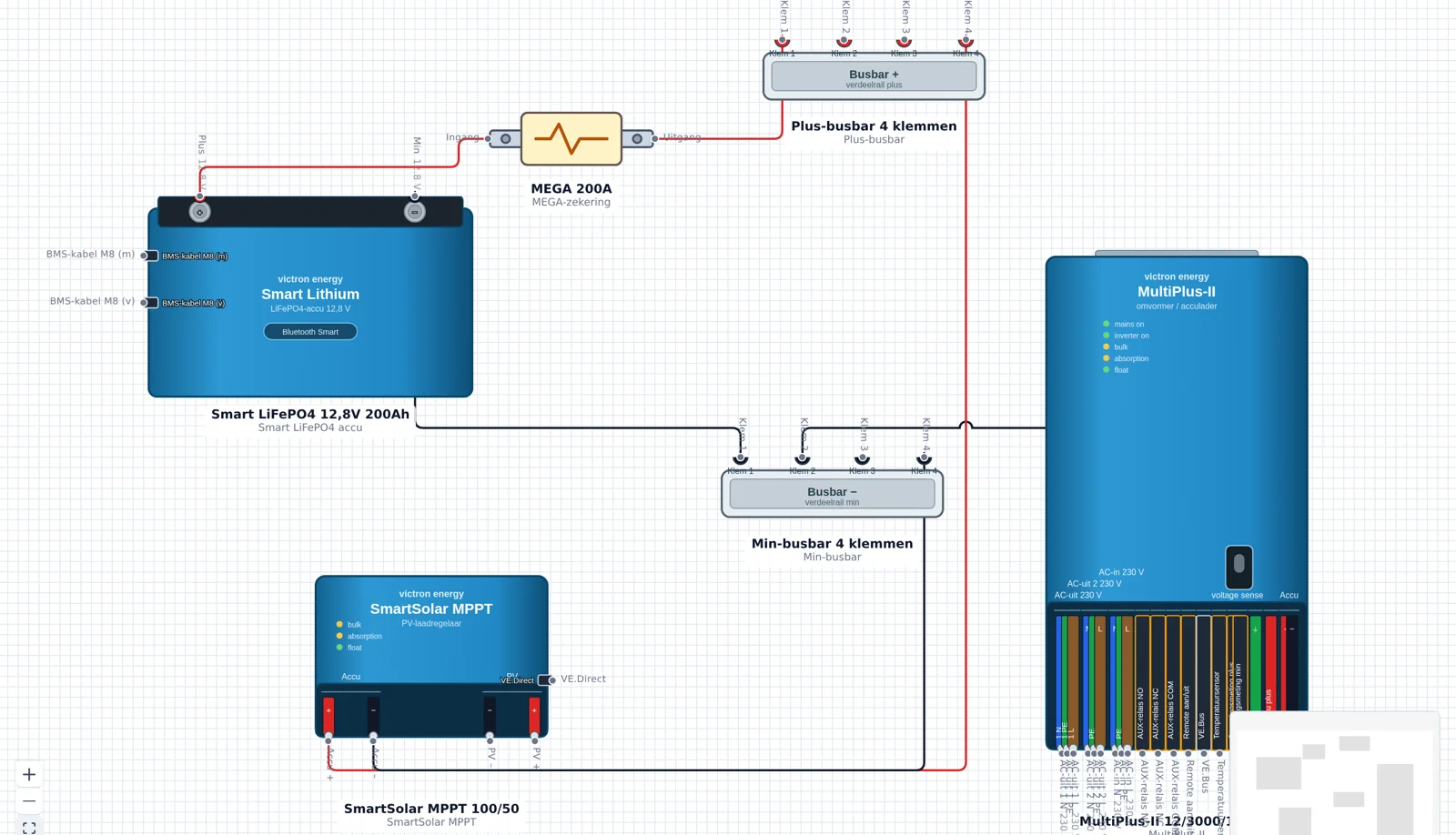
Every part comes from the component library with real ports, voltages and currents.
Lead acid or LiFePO4, single or in series for a 24V or 48V bank.
Panels in series or parallel to a charge controller at the right voltage.
Charge controllers between solar and battery, including Victron models.
Charging from the alternator or starter battery over a DC-DC charger.
From 12V or 24V to 230V for your onboard appliances.
Mains connection with battery charger, RCD and circuit groups.
Lighting, pump, fridge and other loads with a fuse per circuit.
Sockets and fixed connections behind your inverter or shore power.
Drag an inverter/charger, charge controller, fuse holder or busbar onto the canvas with the terminals the device really has. You can only connect points that exist.
Per connection the app checks whether positive, negative, line, neutral and earth belong together, whether the branch is fused and whether the conductor size fits the current and length.
The editor runs in the browser. You start drawing right away; an account is only needed to save projects and export a PDF.
WireElectric calculates along as you connect parts and reports what does not add up.
The required cross-section follows from current, length and allowed voltage drop.
A fuse that does not match the cable or the device is flagged.
Per cable you see the loss in volts and percent.
Ports that do not match in voltage or type raise a warning.
The library focuses on DC systems with an AC section:
12V, 24V or 48V for the DC side, with 230V behind it if you use an inverter or shore power.
Battery bank with main fuse and busbars, then the charge sources: solar, alternator or mains charger.
Distribution, fuses, switches and loads. Cable length and conductor size are filled in per connection.
Work through the findings, adjust what is needed and save the diagram or print it as a PDF.
Every calculator answers one question about your installation. WireElectric then runs the same calculations for every connection in your complete diagram.
Find the cross-section that suits your 12V or 24V system, based on current, length and voltage drop.
View →Find a suitable fuse for your circuit, including a check on whether the cable can carry it.
View →Check how much voltage you lose over a cable and what reaches your load.
View →Work out how much battery capacity in Ah you need for your daily use and autonomy.
View →Calculate how long a battery can power a load, including the usable share and inverter losses.
View →Convert power straight to current at 12V, 24V, 48V or 230V.
View →Work out indicatively how many Wp of solar panels your daily consumption needs.
View →Most diagram tools are built for buildings or electronics: you draw lines and boxes, but the tool has no idea what an MPPT charge controller or a shunt is. A simple 12V diagram then takes hours and nothing gets verified. In WireElectric the components come first. Every device has the terminals it really has — positive, negative, AC in, AC out, PV, earth — and every connection knows which voltage and current it carries.
You can start drawing without an account.
Open WireElectric